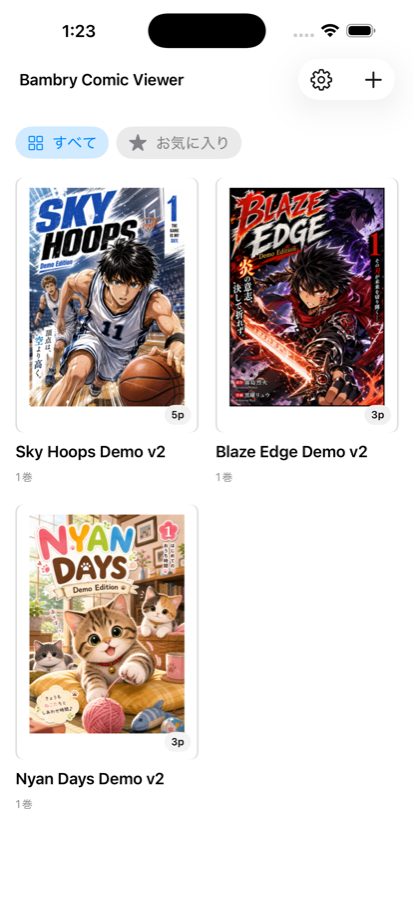
Whether your PDFs are on your device or in Google Drive, BAMBOO Comic Viewer treats them as one library. What matters is not where a file is stored, but which title and volume you want to read now.
Usage note
BAMBOO Comic Viewer is for reading PDF and other content that you have legitimately prepared for your own personal use. It is not intended for viewing, obtaining, or sharing illegally uploaded content, pirated content, or any content that infringes rights or violates the law. Please do not use it for those purposes.
Turn your PDF collection into a comic shelf
When you add PDFs, the app estimates titles and volume numbers from file names, then groups them by series on the home screen.
- Series-based library grid
- Volume lists sorted by estimated order
- Library covers with thumbnails
- Long-press editing and series-level deletion
Resume reading and move to the next volume naturally
Your reading position is saved automatically. The home screen surfaces where you left off, and the final page can guide you to the next volume.
Finished books are marked as read, so you can keep moving through a series without losing context.
Adjust spreads and page starts for each book
Comic PDFs can shift out of alignment depending on how the first page is handled. Per-book settings help keep spreads paired correctly.
- Right-to-left and left-to-right reading direction
- Single-page and two-page spread display
- Odd-page or even-page start settings
- Thumbnail seeker for page navigation
- Reader layouts that adapt to iPhone and iPad orientation
Keep cloud PDFs only when you need them
You can add PDFs from Google Drive, browse folders, select PDFs, or sync only a specified folder.
- Google Sign-In for Drive access
- Folder navigation inside Drive
- Folder-scoped sync
- Download only the volume you read
- Pre-cache first volumes and likely next volumes
- Remove completed Drive PDF files while keeping covers and library metadata